Image Mapping on mediawiki: Difference between revisions
Jump to navigation
Jump to search
Ttenbergen (talk | contribs) |
Ttenbergen (talk | contribs) |
||
| Line 12: | Line 12: | ||
rect 9 158 141 182 [[APACHE_II]] | rect 9 158 141 182 [[APACHE_II]] | ||
rect 9 188 141 211 [[Diagnostic Data available in the Critical Care and Medicine Database]] | rect 9 188 141 211 [[Diagnostic Data available in the Critical Care and Medicine Database]] | ||
rect 9 215 141 237 [[ | rect 9 215 141 237 [[Procedure Data available in the Critical Care and Medicine Database]] | ||
rect 9 244 141 266 [[Acquired_Diagnosis_/_Complication]] | rect 9 244 141 266 [[Acquired_Diagnosis_/_Complication]] | ||
rect 8 269 142 293 [[Pharmacy_collection]] | rect 8 269 142 293 [[Pharmacy_collection]] | ||
Revision as of 12:17, 15 February 2018
Image mapping means designating parts of a photo, drawing or screen shot to act as links on a web site. On mediawiki this is implemented with the ImageMap Extension]; it comes with MediaWiki and is enabled on this wiki.
One of the tasks in creating an image map is to determine the area of the image that should become the link. https://www.image-maps.com/upload.php is a useful tool for this. You will need to change the output from html to MediaWiki markup, but it still designates the areas pretty well. No login is required even if it initially looks like it.
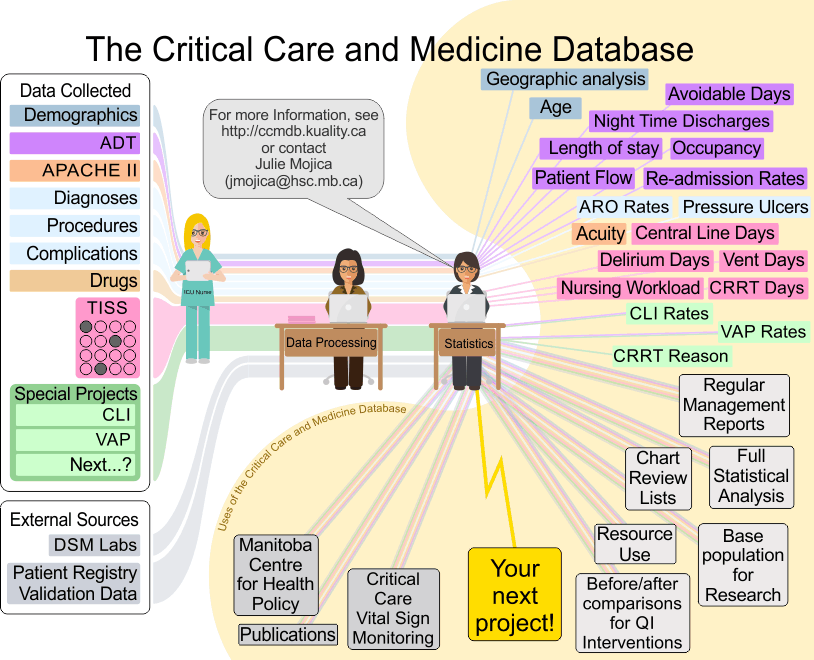
Imagemap test/example
Clickable image map, click on individual elemets to be taken to the corresponding wiki page.
Code
<imagemap>
Image:CCMDB Description.png|alt=Description of CCMDB sources and outputs
rect 9 104 141 128 [[Demographics]]

...

rect 238 624 337 646 [[Publications]]
</imagemap>