News and backup: Difference between revisions
Ttenbergen (talk | contribs) m →Process |
Ttenbergen (talk | contribs) mNo edit summary |
||
| Line 26: | Line 26: | ||
The "'''News and Backup'''" batch file is a batch file on each '''laptop''' which does the following: | The "'''News and Backup'''" batch file is a batch file on each '''laptop''' which does the following: | ||
* [[batstart.bat]] | * [[batstart.bat]] | ||
** sets the [[Laptop | ** sets the [[Laptop identifier]] | ||
** checks if there is a newer version of [[backup.bat]]; if so, it downloads it | ** checks if there is a newer version of [[backup.bat]]; if so, it downloads it | ||
** calls [[backup.bat]] | ** calls [[backup.bat]] | ||
| Line 35: | Line 35: | ||
** '''move''' the file from the regional server to c:\ccmdb_'''program''' | ** '''move''' the file from the regional server to c:\ccmdb_'''program''' | ||
** open the wiki to [[Log]] to show what has changed | ** open the wiki to [[Log]] to show what has changed | ||
** copy log file CCMDB_backup_log.txt to the corresponding [[Regional Server]]\data\< | ** copy log file CCMDB_backup_log.txt to the corresponding [[Regional Server]]\data\<[[Laptop identifier]]>; this log would show you when people have run news and backup and if there were errors. | ||
== Setting up the file on a laptop == | == Setting up the file on a laptop == | ||
If the laptop is set up according to [[Laptop Setup]] then the batch files and shortcuts will be copied down as part of the process. | If the laptop is set up according to [[Laptop Setup]] then the batch files and shortcuts will be copied down as part of the process. | ||
* | *The only thing to do locally would be to [[#Edit parameters for identifier]]. | ||
=== Edit parameters for | === Edit parameters for identifier === | ||
# right-click the news-and-backup shortcut and click "edit" | # right-click the news-and-backup shortcut and click "edit" | ||
#* '''Don't double-click''' because that would run the file | #* '''Don't double-click''' because that would run the file | ||
#* [[File:News and backup context menu.png | 150px]] | #* [[File:News and backup context menu.png | 150px]] | ||
# go to the line that starts with "set ml=", should be around line 12 | # go to the line that starts with "set ml=", should be around line 12 | ||
# change the "somewhere" to the [[Laptop | # change the "somewhere" to the [[Laptop identifier]], i.e. your directory on the regional server, e.g. HSC_H4 | ||
#* don't add spaces | #* don't add spaces | ||
#* make sure it's the directory used for the [[Laptop | #* make sure it's the directory used for the [[Laptop identifier]], for legacy reasons this might not be the main ward now collected on | ||
# menu file save, menu file close | # menu file save, menu file close | ||
#* [[File:News and backup edit menu.png | 400px]] | #* [[File:News and backup edit menu.png | 400px]] | ||
| Line 68: | Line 68: | ||
== Updating the file == | == Updating the file == | ||
BatStart.bat looks for an update to backup.bat in regional server\programs\< | BatStart.bat looks for an update to backup.bat in regional server\programs\<[[Laptop identifier]]>; that file will replace the local one. | ||
Make sure [[Batstart.bat#Log]]/[[Backup.bat#Log]] is updated with any changes. | Make sure [[Batstart.bat#Log]]/[[Backup.bat#Log]] is updated with any changes. | ||
| Line 77: | Line 77: | ||
Main office uses [[Backup_Checker.vbs]] to make sure the backups are working. | Main office uses [[Backup_Checker.vbs]] to make sure the backups are working. | ||
== Related articles == | |||
{{Related Articles}} | |||
Revision as of 12:27, 2 March 2020
This article is about the "News and Backup" process collectors use to back up data from their laptop.
Backing up
To back up, double-click on the "News and Backup" shortcut on your desktop.
How often should you run News and Backup?
The following are the minimally required news and backups and their reasons:
- at beginning of collection with a laptop before data entry
- this ensures that you have the newest version of the program
- at end of collection day with a laptop (whether you send or not)
- very rarely things go wrong during sending; making a backup just before sending means we would be able to restore you to that version if sending corrupts your data
- also, it gives main office data to go on if they have to do any "forensics" on your data if send made a mess at our end; sometimes the Data processor will re-send data from this backup so you don't have to.
- just before sending'
- after sending but before DELETING any files from laptop
- again, this gives the main office data to review in case something went wrong with the send.
You can additionally back up mid day. In theory you can do this as frequently as you want, but there are draw backs: we only keep the last 20 backups, so if you back up 10 times a day we only have 2 days of backups for you. So, if we found out that we want to know something that happened last week, then if you did 10 a day we would no longer have the data, but if you did 3 a day, we usually would still have the data. So, be reasonable in your backup frequency.
Importance of backup to REGIONAL SERVER
The Main office has the opportunity to get data from these backups if there is a problem.
- Example of this is June 7.13 when new program was rolled out, postal code and color for overstay in TMP was being sent to TMPV2.mdb as "chinese type" letters. Main office was able to retrieve from regional server for site that backed up their data.Trish Ostryzniuk 17:00, 2013 June 10 (EDT)
- another example of this: Nov.13 - discovered that ICU Pharmacy items YES NO not going into pharmacy.mdb or centralized.mdb from first week of June to Aug 13.13. Because of backups to Regional Server, the Main office had the opportunity to pull together copies of these backups and retrieve the "lost pharm data". This has saved the data collector from having to recollect pharmacy data from the chart.Trish Ostryzniuk 15:49, 2013 December 3 (CST)
Process
For the most up-to-date workings of this file see the file itself and the change logs at Batstart.bat#Log and Backup.bat#Log
The "News and Backup" batch file is a batch file on each laptop which does the following:
- batstart.bat
- sets the Laptop identifier
- checks if there is a newer version of backup.bat; if so, it downloads it
- calls backup.bat
- backup.bat
- back up to local backup directory c:\ccmdb_data\ccmdb_backups w 20 versions of CCMDB_data.mdb
- back up to server w 20 versions of CCMDB_data.mdb to the regional server
- check if there is a file Regional Server\Programs\<hosp>_<ward>\ccmdb.mdb; if so,
- move the file from the regional server to c:\ccmdb_program
- open the wiki to Log to show what has changed
- copy log file CCMDB_backup_log.txt to the corresponding Regional Server\data\<Laptop identifier>; this log would show you when people have run news and backup and if there were errors.
Setting up the file on a laptop
If the laptop is set up according to Laptop Setup then the batch files and shortcuts will be copied down as part of the process.
- The only thing to do locally would be to #Edit parameters for identifier.
Edit parameters for identifier
- right-click the news-and-backup shortcut and click "edit"
- Don't double-click because that would run the file
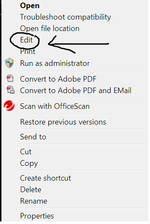
- go to the line that starts with "set ml=", should be around line 12
- change the "somewhere" to the Laptop identifier, i.e. your directory on the regional server, e.g. HSC_H4
- don't add spaces
- make sure it's the directory used for the Laptop identifier, for legacy reasons this might not be the main ward now collected on
- menu file save, menu file close


if the shortcut is missing...
Testing News and Backup
After initial setup test that the backup works:
- open and close ccmdb.mdb to update date stamp of file on the client laptop
- execute the News and Backup batch file to perform the process
- check that ccmdb.mdb file with new stamp is on c:\ccmdb_data\ccmdb_backups
- check that ccmdb.mdb file with new stamp is on Regional Server/data/<hsp>_<ward>
Information about the batch files
A two-file system is used to allow batstart.bat to actually look for a new backup.bat before each run, allowing a central update of that file if necessary. This allows for centralized updating/tweaking/etc of the laptops.
Batstart.bat uses Robocopy, sort of an improved version of xcopy, which is available from Microsoft as part of one of their Server SDKs.
Updating the file
BatStart.bat looks for an update to backup.bat in regional server\programs\<Laptop identifier>; that file will replace the local one.
Make sure Batstart.bat#Log/Backup.bat#Log is updated with any changes.
Error checking
Just do your backups and assume they work, there is no need for collectors to routinely check that the backups to the regional server are working. Data Processor in Main office checks regularly that backups are being done, so if backups are not making it to the regional server we will let you know.
Main office uses Backup_Checker.vbs to make sure the backups are working.

